Yes, I've heard of this issue. Feel free to skip all the techno mumbo-jumbo below and go to the last paragraph.

For every key (73 in your case) there are two switches: one that senses when you press a key partially down (lets call this high) and another one that senses when you've pushed it down fully (lets call this low).
When press a key down, first the high switch closes and then (a fraction of a second later) the low switch closes. The time between the two switches closing is used to calculate how quickly (velocity) you pressed the key down, which is also a measure for how much force you used (more force, key goes down faster).
If one of the two switches does not work, you get problems. If the high switch does not work, the Nord only sees the low switch pressed and this results in maximum velocity. If the low switch does not work, it will appear as if you didn't press the key down all the way and this will result on a missing key press (zero velocity). Single switches failing could be caused by dirt in the keybed, for example; this is the typical 'velocity problem' and you should be able to find quite a bit of info on the forum about this.
Your case is more complex though: multiple keys have issues.
Note that when playing organ sounds, the Nord only uses either the high or the low switch; which one is used can be configured in the system menu. I'm not an organ player, but as I understand it using the high switches allows for a more authentic feel and playing style. Since only a single switch is used per key, the Nord cannot determine velocity. I think it will send out MIDI data with maximum velocity when playing an organ on a Nord. This also explains why (in general) using a C1 or C2 organ as a MIDI controller is not ideal, although there might be a way to get the C1/C2 to send velocity data, since the keyboard does actually contain both a high and low switch for every key and the hardware in the C1/C2 is actually able to 'read' both switches.
Since every key has two switches, there are 146 switches (2 x 73) in total; in reality there are more, since there are also quite a few switches on the top panel. If the processor had to check for 146+ switches whether they were closed or not, it would need quite a large number of inputs and the circuit boards in your Nord would become rather complex (and expensive). Instead, they create a button matrix.
Imagine a keyboard with 16 keys in total. If you want to check which keys are pressed, the easiest way would be a micro controller (think a fairly simple processor/CPU) with at least 16 inputs. It can be done in a much smarter way though; you could divide those 16 keys up into 4 groups (A thru D) of 4 keys (1 thru 4). This is shown in figure 1.
Figure 1
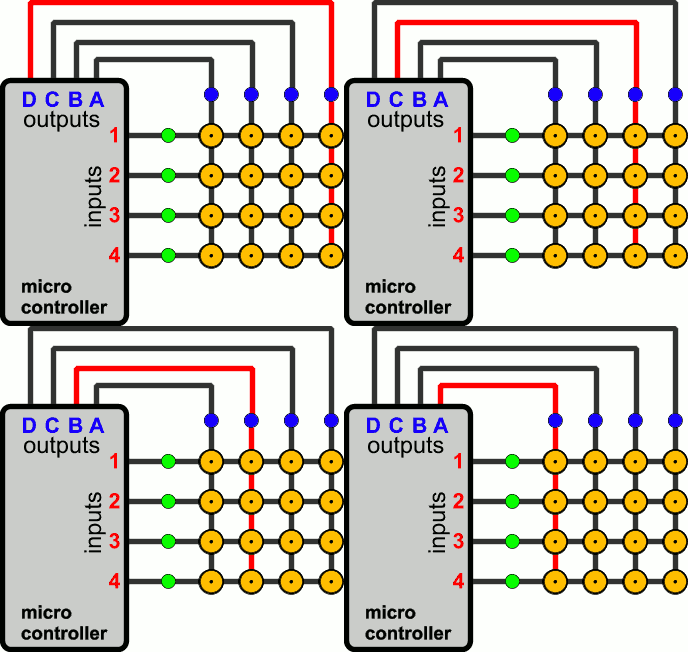
The micro controller will cycle through its outputs (A thru D) and send a signal out the outputs, one at a time. Note figure one shows it going through the outputs in reverse order, D down to A and then back to D again.
If a key is pressed, as some point the micro controller will receive a signal on one of its inputs (1 thru 4). Figure 2 shows how this works. The purple key (C3) is pressed. When the micro controller sends the signal via output C, it receives it back via input 3 - it then knows key C3 must be pressed. As can be seen in figure 1, the micro controller is effectively scanning rows of switches, going from right to left. If C1 were also pressed, it would receive the signal on both inputs 1 and 3 as soon as output C is used.
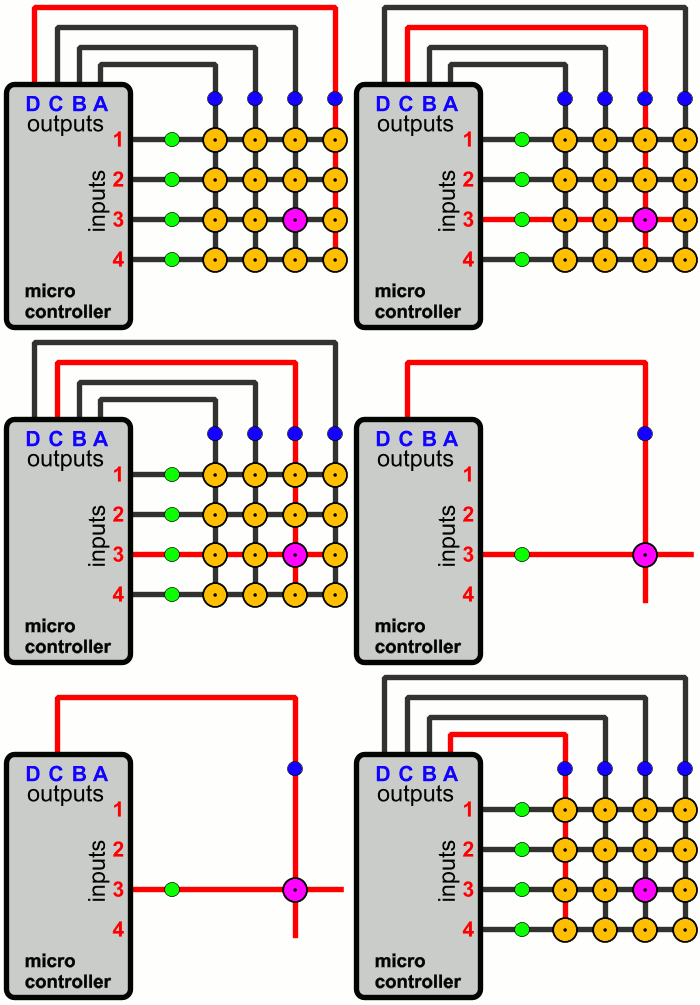
This site has more information (the animations also come from that site):
http://pcbheaven.com/wikipages/How_Key_Matrices_Works/
For this imaginary keyboard with 16 keys, we only need 4 outputs and 4 inputs (a 4x4 button matrix), so 8 in total; compare that with the 16 of the simplest solution (a single input for every key). As the number of switches (keys) increases, the 'savings' you can achieve with a button matrix (8 in this example, so 50%) gets larger and larger. For example, for 73 switches, you could use a 7x12 (84 possible switches, 7+12=19 in/outputs), 8x10 (80 switches, 18 in/outputs) or 9x9 (81 switches, 18 in/outputs).
A 7x12 button matrix would be easy to understand. The outputs can be seen as the octave (1 thru 7) and the inputs could be the keys in an octave (C thru B, A thru G#, etc.). The micro controller would essentially be scanning the keys one octave at a time. If it would do this many thousands of times per second, it would appear as if it was able to check all switches at the same time.
A 12x7 button matrix is similar. The outputs would be the keys in an octave (C thru B) and the inputs the different octaves. The micro controller would essentially be checking all Cs, then all C#s, then all Ds, etc.
Most likely the button matrix used isn't actually 7x12 or 12x7. I think they used 2-3 chips to read the switches (keys + control panel) on the Electro 2, so this is probably the case for all Nords.
TL;DR
In your case, it could be a defective diode (see the page I linked above), an issue with one of those chips that scans the switches or perhaps an issue with the cables that connects the switches in the keyboard to those chips 'scanning' them. Based on the exact pattern of the failures you see, you can probably rule out specific causes (i.e. rule out it cannot be a defective diode). In your case they seem to have concluded one of those chips (ICs) is defective, so they'll probably replace the main circuit board in your Nord.