A Patch Editor for the Nord Stage (based on Ctrlr)
Posted: 19 Oct 2011, 22:44
Hi,
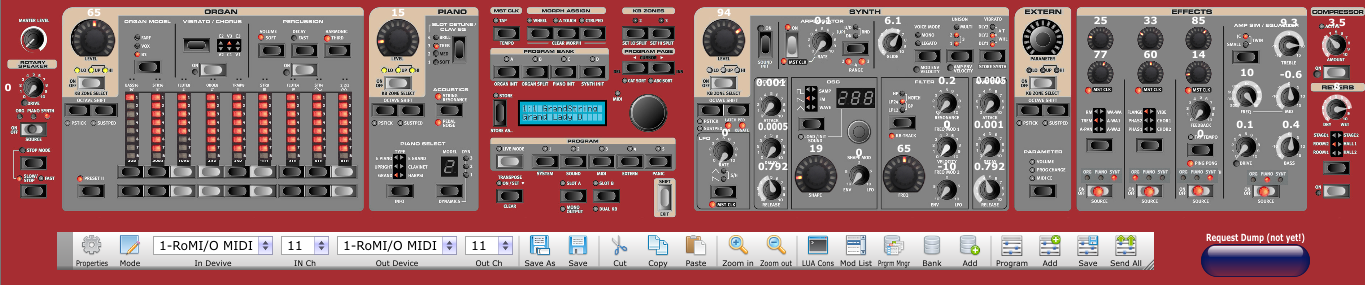
I have been looking for a MIDI Librarian/Patch Editor for a long time now. Having used SoundDiver and ChangeIt before, there seemed to be no future for those tools controlling Hardware Instruments. And while I thought having seen all and every piece of software finding MIDIQUEST to be the best (but expensive and not 100% flexible) solution, I finally found what I was looking for: A new, actively developing, freeware, open source multi OS MIDI Patch Editor / Librarian: http://ctrlr.org/
Updates:
-RC1: Release Candidates for the Nord Stage Classic/EX and Nord Stage 2 are now ready.
-16 Nov 2011: RC2 with Octave indication and some minor bugfixes.
How to use it?
If you have problems or questions, please reply to this thread!
Cheers,
Johannes
I have been looking for a MIDI Librarian/Patch Editor for a long time now. Having used SoundDiver and ChangeIt before, there seemed to be no future for those tools controlling Hardware Instruments. And while I thought having seen all and every piece of software finding MIDIQUEST to be the best (but expensive and not 100% flexible) solution, I finally found what I was looking for: A new, actively developing, freeware, open source multi OS MIDI Patch Editor / Librarian: http://ctrlr.org/
Updates:
-RC1: Release Candidates for the Nord Stage Classic/EX and Nord Stage 2 are now ready.
-16 Nov 2011: RC2 with Octave indication and some minor bugfixes.
How to use it?
- Download Ctrlr for your OS (Win/OS/Linux) from http://ctrlr.org/ and install it.
- Download the Nord Stage Panel from here:
- For the Nord Stage Classic/EX: Nord Stage C/EX Patch Editor
- For the Nord Stage 2: Nord Stage 2 Patch Editor
- Load the Panel in Ctrlr and select your MIDI interface using the "Devices" Button
- Select your MIDI in and ouput device and channel in the Tool bar drop down menus.
- On your Nord Stage Classic/EX/2, hit SHIFT+MIDI then scroll to the Option "Send MIDI Ctrl". Select the Panel you want to edit/view (A or B) and press the red STORE button. This makes the Nord Stage send the current values of ALL CC controllers over MIDI and the replicated Panel on your Computer should now show all the values of your Nord Stage.
If you have problems or questions, please reply to this thread!
Cheers,
Johannes

 ... inspired by your avatar
 . It's fantastic Johannes! Congrats for having discovered this superb software


