Page 6 of 10
Re: Add Drawbars to my Nord?
Posted: 01 Jul 2011, 15:45
by Hanon_CTS
jazzfer wrote:tell us the link of IMHO
Hello Jazzfer,
I think what lennaerttol was trying to say was more this:
lennaerttol wrote:
Isn't there a cheap controller with drawbars like those on a real B3?
IMHO "In My Humble Opinion"
$300 + $40 to ship it to Europe is a bit expensive for a piece of wood and plastic... Can you use 2 controllers to control the upper and the lower manual without pressing a button?
I tend to agree with lennaerttol, $300 is a bit steep.
I'm not saying that the OceanBeach product isn't worth every penny, just that I haven't been close enough to the product to do any type of testing. Nor has any other forum member that isn't affiliated with the product.
I started this thread almost 3 months ago to see if any of the forum members had hands on experience with the Ocean Beach Digital DB-1 product
Given that I found this completed auction on e8ay, somebody got MIDI drawbars for less ;)
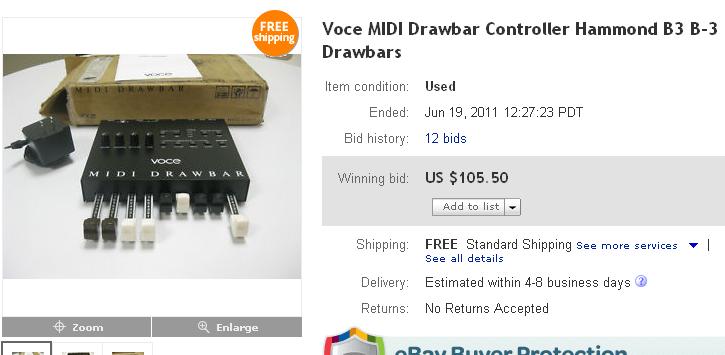
- e8ay_drawbars.JPG (35.91 KiB) Viewed 7091 times
Re: Add Drawbars to my Nord?
Posted: 01 Jul 2011, 17:42
by OBDave
Well, couple things to keep in mind. The Voce Drawbars worked great with the V3, but they weren't designed for controlling a Nord. So it's really not a fair comparison because:
* the Voce drawbars won't send the correct MIDI CC's for the Nord. So you will also need a MIDI Solutions Event Processor ($150 + S&H) which you'll need to program with a PC to remap the Voce CC values to the Nord CC values.
* the Voce drawbars won't control both upper and lower organ manuals
* the Voce drawbars won't actually fit on your Nord without the drawbars hanging over the keys, so you'll have to rig up some sort of stand
* the Voce drawbars are not MIDI bus powered, you'll need a wall-wart power supply
* the Voce drawbars probably will not power the Event Processor, so it will need a power supply of its own (the MIDI Solutions Power adapter is $50 + S&H) and requires its own wall-wart. Either that, or you'll have to open up the MIDI Drawbars and mod them. (I say "probably" because I'm not absolutely certain about the MIDI Drawbars. But this is definitely true of the Voce V5 - you have to mod it before it can power downstream MIDI devices).
I know all this firsthand because for awhile I was using a V5 to control my Electro. It worked, but all these extra piece made it pretty cumbersome to set up and tear down. I figured there had to be a better way and developed the DB-1. The DB-1 solves all these problems. There's not that many users on this forum, but feel free to search over at the Keyboard Corner or Yahoo Clonewheel for independent reviews.
Regards,
Drawbar Dave
Re: Add Drawbars to my Nord?
Posted: 02 Jul 2011, 23:19
by muckmuck
Hi All, I own a stage EX so I haven't really looked around on the Electro section before and saw this thread so... I bought the original Ocean Beach DB-1when it first came out about 6 months ago and I totally loved it!! So much so that I just bought the new DB-1 series II. I like the sound of the nord organ and l love the nord stage in general, but simply can't deal with the LED drawbar control thing (although being able to see the preset registrations in nice). Also, if you're playing in the sun? - Good luck! I never could understand why Nord put so much effort into making such a nice organ and not have a real drawbar option - the big reason many real organ players would never even consider using a Nord/C1/C2 etc. And $299 for it? Well, I can tell you that this is not some big time gear manufacturer. This is a small, cottage production, and his first product, I believe, and the production run and demand is small. I can tell you that these units are extremely well built (all metal chassis - not plastic) and well thought out and works beautifully. The Series II are improved over the Series I (can use 9v batteries, midi bus power, or AC, sexier, smaller form factor) and far more esthetically pleasing then the first version. I'm pretty new at this forum but I'm surprised that more electro users haven't caught on to this thing. If you've been pining for drawbars for these boards like me - prayer answered! And, for any cynical types out there - nope - I don't work for Occean Beach Digital ;-) Cheers, everyone!
Re: Add Drawbars to my Nord?
Posted: 13 Jul 2011, 13:56
by jazzfer
at last the future is here....
I introduced to you the new double drawbars midi controller....
your dreams came thru.... control the sound of both keyboards (uper/lower) whith only a 9 set of drawbars... only switching a key
the future is here... you can control tour nord or your Native Instruments B4 II or any Hammond emulator by midi...
next the video of the device...
hold the line....
Re: Add Drawbars to my Nord?
Posted: 15 Jul 2011, 13:59
by jazzfer
the protoipe is working ok... and all thing is going well....
its not finished, but is looking fine...
the magnetic level fix it on the nord...
Re: Add Drawbars to my Nord?
Posted: 15 Jul 2011, 20:06
by lily0971
Hi,
Great job Jazzfer...
I might be interested in it, if not as expensive as Oceanbeach drawbars
Re: Add Drawbars to my Nord?
Posted: 18 Jul 2011, 10:18
by jazzfer
the work is end
and this is the item
whith magnetic level to fit it to your nord
I´m recording a video in this moment for see it working.... hold the line
Add Drawbars to my Nord?
Posted: 18 Jul 2011, 19:20
by organut
Looks great! But there doesn't seem to be enough space for it on my Stage 2 compact.
Re: Add Drawbars to my Nord?
Posted: 18 Jul 2011, 19:43
by jazzfer
i think theres no problem for the nord compact... is the same dimansion of the nord electro 3... only need 195 mm to fit it in the left hand of your nord...
and works so fine..................
visit the web
http://www.norddrawbarscontroller.com
Re: Add Drawbars to my Nord?
Posted: 18 Jul 2011, 20:53
by iaorana
jazzfer wrote:i think theres no problem for the nord compact... is the same dimansion of the nord electro 3... only need 195 mm to fit it in the left hand of your nord...
Unfortunately, no,
jazzfer ! On a Nord Stage 2 SW73, there are no more than 50 mm free between the left wooden side and the (wooden too ;-)) joystick :-(