Page 2 of 2
Re: Connecting an ipad and playing sound through Nord
Posted: 08 Apr 2024, 09:05
by Berretje
EnjoyRC wrote:I switched to a MOTU M4. USB-C direct to iPad or iPhone. Buss powered. Headphone out to NS4 monitor input. PERFECTLY quiet!!!
I'm using the M4 as well. Had to buy a better quality USB-C cable because the cable that came with it causes a lot of clicking noises.
Re: Connecting an ipad and playing sound through Nord
Posted: 08 Apr 2024, 10:08
by maxpiano
cookie wrote:I connect my ipad (and control my ipad sound app) using the Korg iPlug MIDI/Audio interface, back to the monitor input of my Stage 3.
Fred
Just for info to all, unfortunately Korg iPlug is no longer on the market (discontinued a few years ago, so can only be found in the used market) and it was Lightning only (so would not be useful for usb-c iPads)
Re: Connecting an ipad and playing sound through Nord
Posted: 10 Apr 2024, 05:52
by Crusty
I found on some computers, if you use a cheater plug to go from 3 prong to two, it cuts down on noise. Then you also get the old school option of reversing polarity to find best sound,,,
Re: Connecting an ipad and playing sound through Nord
Posted: 23 Apr 2024, 08:25
by Roselan1
Hi Sonny, the sound typically comes from the iPad when using it as a sound source, even if the MIDI signal is from your keyboard. To get the sound from your keyboard, you’ll need to connect the iPad to your mixer or speakers via an audio cable. MIDI only transmits data, not audio.
Re: Connecting an ipad and playing sound through Nord
Posted: 20 May 2024, 20:25
by Deleted User 39133
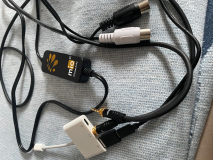
So I connect my iPad to the north
Re: Connecting an ipad and playing sound through Nord
Posted: 20 May 2024, 21:44
by Heatha05
Rolfka - you could probably just connect the Nord directly via USB and avoid the USB - 5 pin DIN adapter. Audio still on the separate connection, though.
Might make life easier!
Re: Connecting an ipad and playing sound through Nord
Posted: 21 May 2024, 07:57
by Deleted User 39133
Thanks for the tip, I'll try it!
Greetings